
Loop Player is a versatile app designed to enhance your audio experience by allowing you to play audio tracks in a repetitive loop. This feature is invaluable for a variety of purposes, such as learning a new language, practicing music, or simply enjoying your favorite sounds. With the ability to set start and end points using the A and B buttons, you can create customized loops tailored to your specific needs. The app also includes tools for cutting and managing audio files, making it easy to organize and access your loops. Thanks to its user-friendly interface and wide range of functions, Loop Player is a must-have for anyone looking to enhance their audio experience.
Unique Tool for Repetitive Sound Playback: Loop Player offers a specialized tool for playing audio tracks on a loop, making it perfect for language learning, music practice, and more. This feature allows users to focus on specific sections of an audio file, enhancing their learning and practice sessions.
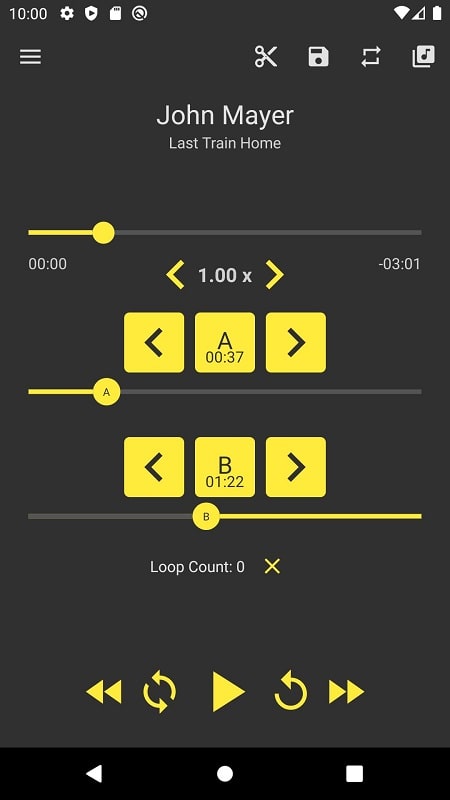
Easy to Use Interface: The app's interface is designed with user-friendliness in mind, featuring clearly labeled A and B buttons for setting loop points and a list feature for organizing saved loops. This makes it easy for users of all levels to navigate and use the app effectively.
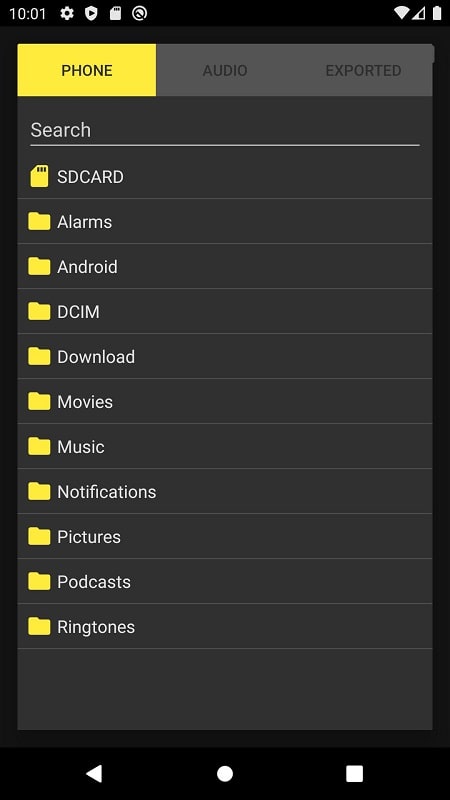
Versatile File Source Support: Loop Player is compatible with audio files from various sources, including social media apps, video platforms, smartphones, and SD cards. This flexibility ensures that users can loop any audio file they need, regardless of its origin.
Special Functions: In addition to loop playback, the app includes extra features such as a cutting tool for audio editing, playback control options, and customizable color themes. These functions enhance the overall user experience and provide additional tools for managing audio files.
Can I create multiple loops for a single audio file in the app?
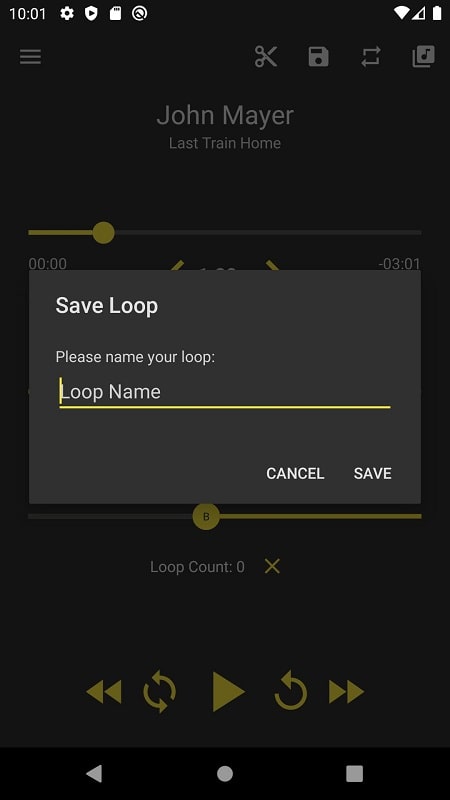
Yes, Loop Player allows you to create and save multiple loops for each audio track. This feature makes it easy to practice specific sections or phrases repeatedly, enhancing your learning or practice sessions.
Is there a limit to the number of loops I can save in the app?
There is no limit to the number of loops you can save in Loop Player, giving you the flexibility to organize and access your saved loops easily. This means you can create as many loops as you need for your audio files.
Can I export my saved loops from the app for use in other applications or devices?
Unfortunately, Loop Player does not currently have an export feature for saved loops. However, you can continue to access and play them within the app for repetitive listening, ensuring that your loops are always available when you need them.
Loop Player offers a unique and versatile tool for playing audio tracks on a loop, making it ideal for language learning, music practice, and more. With its user-friendly interface, support for various file sources, and special functions like cutting tools and customizable themes, the app provides a comprehensive audio playback experience. Whether you're a language learner, musician, or audio enthusiast, Loop Player can enhance your practice and listening sessions with its convenient loop playback feature. Download the app now to explore its full potential for repetitive sound playback.
Forsaken Characters Ranked: Tier List Update 2025
How to Use Cheats in Balatro (Debug Menu Guide)
State of Play Reveals Exciting Updates: PlayStation February 2025 Showcase
Infinity Nikki – All Working Redeem Codes January 2025
Roblox: Obtain Secret Codes for January 2025 (Updated)
Pokémon GO Raids in January 2025
Wuthering Waves: Redeem Codes for January 2025 Released!
LEGO Ninjago Sets Top the Charts (2025)

RenderZ: FC Mobile 24 Database
Download
Kindroid: AI Companion Chat
Download
Photocall TV Mod
Download
Peachy - AI Face & Body Editor
Download
La Pulce fumetti
Download
Score Counter – Count Anything
Download
ParaU: video chat with friends
Download
AI Hairstyle Try On・Bangs・Wigs
Download
WashAssist Dashboard
Download
Alien Invasion RPG: Pro Tips & Tricks
Dec 21,2025
Civilization 7 Adds Giant Maps, Specialized Towns, Steam Workshop
Dec 20,2025

Seven Knights Re:BIRTH Now Live as Strategy RPG
Dec 20,2025

Prinz Eugen Guide: Skills, Builds, Tactics
Dec 20,2025
Guilty Gear Producer Talks Lucy, Balance Changes, and Strive 2.00 at Evo 2025
Dec 19,2025
 Category

 Download











Streamline your social media strategy with our curated collection of powerful management tools. This guide features popular apps like TikTok Studio for content creation and analytics, Instagram for visual storytelling, Facebook Gaming for live streaming, Twitter Lite for efficient tweeting, and more. Discover how Likee, WorldTalk, Quora, Moj, Amino, and Live.me can enhance your social media presence and help you connect with your audience. Learn tips and tricks to manage multiple platforms effectively and maximize your reach. Find the perfect tools to boost your social media success today!
Live.me
WorldTalk-Date with foreigners
Facebook Gaming
Instagram
Likee - Short Video Community
Quora
Twitter Lite