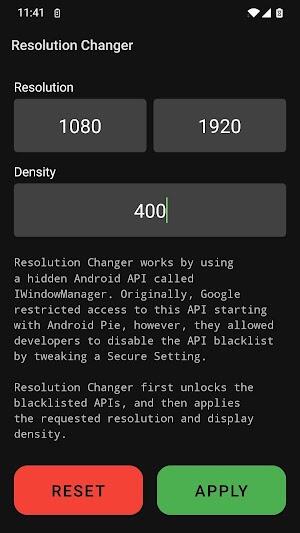
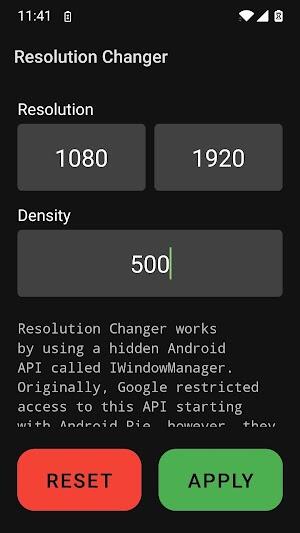
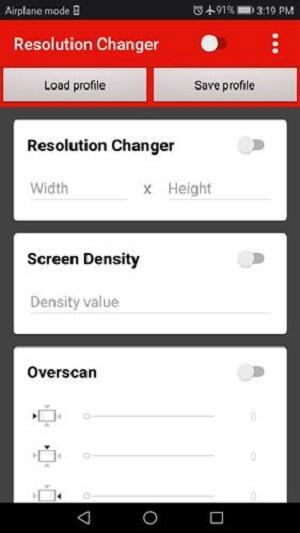
Погрузитесь в мир настраиваемых дисплеев с помощью Resolution Changer APK — новаторского инструмента в области оптимизации мобильных экранов. Это приложение, предложенное tytydraco, выделяется в Google Play как незаменимое для тех, кто хочет настроить параметры дисплея своего Android-устройства за рамки стандартных параметров. Resolution Changer позволяет пользователям точно настраивать разрешение и плотность экрана, что делает его незаменимым дополнением к вашему арсеналу инструментов Android. Если вы стремитесь улучшить игровые визуальные эффекты или оптимизировать производительность, это приложение выполняет свои обещания, что делает его лучшим выбором среди приложений, предназначенных для настройки экрана.
Пользователи тяготеют к Resolution Changer из-за его беспрецедентных возможностей оптимизации производительности. Позволяя регулировать разрешение экрана, это приложение значительно снижает нагрузку на графический процессор, улучшая игровой процесс и общую скорость отклика устройства. Этот аспект Resolution Changer особенно привлекателен для геймеров и опытных пользователей, которым требуется максимальная производительность от своих приложений и устройств. Возможность точной настройки разрешения гарантирует максимальную работу вашего Android, обеспечивая плавность и эффективность работы пользователя.
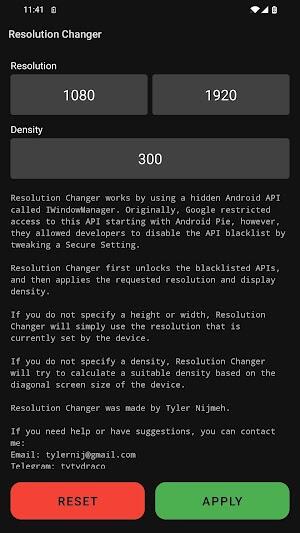
Кроме того, Resolution Changer превосходно справляется с тестированием совместимости и настройкой. Разработчики считают его бесценным для тестирования своих приложений на экранах разных размеров и разрешений, гарантируя бесперебойную работу их приложений на любом устройстве. Функция Smart DPI Calculation предлагает пользователям интеллектуальный способ регулировки плотности дисплея, обеспечивая четкое и четкое изображение с учетом их конкретных потребностей. Этот уровень настройки не имеет себе равных, позволяя пользователям использовать свои устройства так, чтобы они были персонализированы и оптимизированы для их индивидуальных моделей использования.
Resolution Changer упрощает процесс изменения настроек экрана вашего устройства за несколько простых шагов, делая его доступным для всех, кто знаком с базовыми приложениями и функциями Android.
Сначала подключите устройство к ПК, чтобы начать настройку. Этот шаг имеет решающее значение для включения команд, которые будет выполнять Resolution Changer.
После подключения откройте командную строку (CMD) или терминал на вашем компьютере. Здесь вы будете вводить команды, необходимые для того, чтобы Resolution Changer творил чудеса.
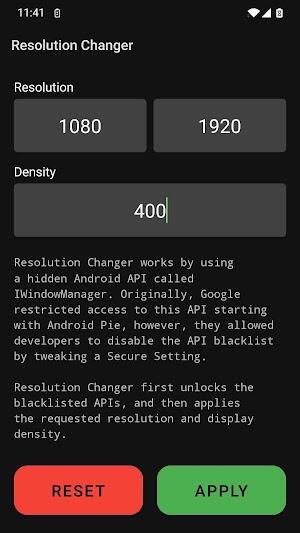
Введите команды adb shell wm size reset и adb shell wm density reset в командную строку или терминал. Эти команды сбрасывают настройки экрана по умолчанию, подготавливая его к новым настройкам.
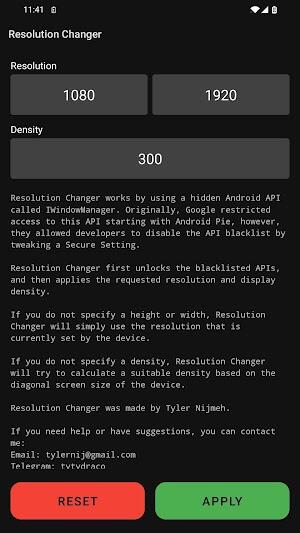
После выполнения вышеуказанных команд Resolution Changer берет на себя управление и применяет запрошенное разрешение и плотность. Этот непрерывный процесс гарантирует оптимизацию дисплея вашего устройства без необходимости выполнения сложных процедур или технических ноу-хау.
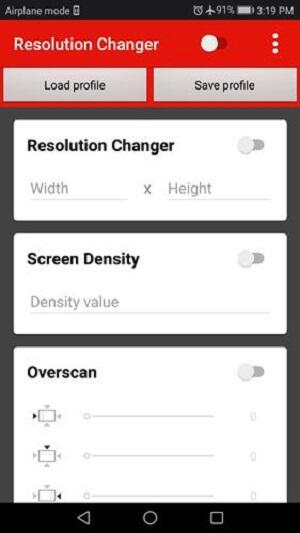
Пользовательское разрешение и плотность: В основе Resolution Changer лежит возможность адаптировать разрешение экрана и DPI к вашим конкретным потребностям. Эта функция меняет правила игры для пользователей, желающих точно настроить параметры дисплея для достижения оптимальной производительности и качества изображения. Если вы стремитесь к более четкому изображению или к более эффективному использованию ресурсов вашего устройства, Resolution Changer обеспечит точность.
Предопределенные разрешения: Для тех, кто предпочитает более простой подход, Resolution Changer предлагает выбор предопределенных разрешений. Эта опция упрощает процесс настройки, позволяя пользователям легко переключаться между различными размерами экрана и соотношениями сторон. Это идеальная функция для пользователей, впервые знакомых с оптимизацией экрана, предоставляющая простой способ изучить возможности своих устройств Android.
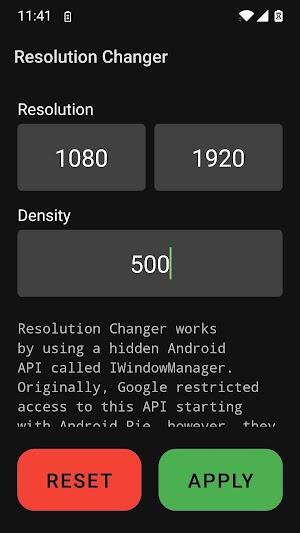
Overscan: Resolution Changer решает проблему границ экрана с помощью функции Overscan. Этот инструмент позволяет вам настроить видимую область экрана, гарантируя, что весь контент будет идеально оформлен, независимо от настроек дисплея по умолчанию. Это важная функция для тех, кто хочет максимально эффективно использовать пространство своего экрана, особенно при подключении устройства к внешним мониторам или телевизорам.
Отображаемая информация: Знания — сила, и Resolution Changer снабжает вас всей необходимой информацией об экране вашего устройства. От размера экрана и частоты обновления до плотности и других важных показателей — эта функция помогает вам принимать обоснованные решения относительно настроек разрешения и плотности. Это ценный инструмент как для обычных пользователей, так и для разработчиков, предоставляющий подробный обзор характеристик дисплея, влияющих на просмотр приложений и контента.
Резервное копирование: Прежде чем углубляться в варианты настройки, предлагаемые Resolution Changer, разумно сделать резервную копию текущих настроек. Эта мера предосторожности гарантирует, что в случае необходимости вы сможете легко вернуться к исходным настройкам дисплея. Сохранение резервной копии — это фундаментальный шаг для всех, кто экспериментирует с различными разрешениями и плотностью изображений на своих устройствах Android.
Проверяйте постепенно: При использовании Resolution Changer применяйте новые настройки постепенно. Такой подход позволяет вам наблюдать за эффектом каждого изменения, не перегружая ваше устройство и не вызывая серьезных проблем с удобством использования. Тестируйте постепенно, чтобы найти идеальный баланс, который повысит производительность и внешний вид вашего устройства без ущерба для стабильности.
Совместимость монитора: Изучая различные настройки экрана с помощью Resolution Changer, следите за тем, как ваши любимые приложения и игры работают при разных разрешениях. Отслеживайте совместимость, чтобы убедиться, что ваши настройки не оказывают негативного влияния на функциональность приложения или удобство использования. Этот совет имеет решающее значение для обеспечения бесперебойной и приятной работы с Android.
Используйте ответственно: Хотя Resolution Changer открывает новый уровень настройки вашего устройства, важно использовать ответственно. Избегайте экстремальных модификаций, которые могут сделать ваш экран непригодным для использования или излишне перегрузить аппаратное обеспечение вашего устройства. Тщательно настраивая настройки, вы гарантируете, что ваше устройство останется функциональным и приятным в использовании, что позволит вам воспользоваться преимуществами Resolution Changer, не сталкиваясь с непредвиденными последствиями.
Использование возможностей Resolution Changer превращает ваше устройство Android в более универсальный и персонализированный инструмент. Благодаря множеству функций, предназначенных для оптимизации и настройки, становится ясно, почему это приложение является обязательным. Являетесь ли вы геймером, которому требуется повышенная производительность, разработчиком, стремящимся к более широкому тестированию совместимости, или просто человеком, который любит адаптировать свою цифровую среду, Resolution Changer станет идеальным решением. Готовы поднять дисплей вашего устройства на новую высоту? Загрузите Resolution Changer APK сегодня и раскройте весь потенциал Android.
Ответственные символы: обновление списка уровней 2025
Как использовать читы в Balatro (Руководство по меню отладки)
Состояние игры раскрывает захватывающие обновления: PlayStation февраль 2025 г. Витрина
Infinity Nikki – все рабочие коды активации, январь 2025 г.
Roblox: получите секретные коды на январь 2025 г. (обновлено)
Pokémon GO Рейды в январе 2025 года
Выпущены коды активации Wuthering Waves: январь 2025 года!
Lego Ninjago устанавливает верхние графики (2025)
Title: Tong: Food Fighter – Android Brawler Released Get ready to spice up your mobile gaming experience with Tong: Food Fighter, the explosive new Android brawler that’s hitting the app stores today! Combining fast-paced combat, over-the-top food-themed abilities, and a vibrant, cartoonish world, Tong: Food Fighter is the ultimate fusion of culinary chaos and adrenaline-pumping action. What’s the Buzz? Crazy Food Combat: Play as Tong, a fearless warrior forged from spicy chili peppers, ramen noodles, and hot sauce. Summon fiery tempura strikes, unleash a tornado of sushi rolls, and battle enemies using moves inspired by your favorite global cuisines. Dynamic Brawler Gameplay: Swipe, dodge, and unleash devastating combos in real-time combat. Master each character’s unique fighting style—whether you’re a kung-fu kebab master or a dumpling dodger. Exotic Arenas: Fight across locations like the Sizzling Streets of Bangkok, the Spicy Suburbs of Seoul, and the Fried-Fire Festival in New York City. Roguelike Progression: Unlock new food-based abilities, custom combos, and unlockable food legends like "Wok the Dragon" and "Miso Mage." Multiplayer Mayhem: Challenge friends in online 1v1 battles, co-op food-tossing modes, or join the weekly "Taste-Off Tournament" for exclusive cosmetic rewards. Why Fans Are Raving: “It’s like Street Fighter met Master Chef—and the result is pure chaos fun!” – GameTaste Daily “The sound effects alone—crunching fries, sizzling wok, and a villain yelling ‘You’ve ruined my curry!’—are worth the download.” – Android Gamer Pro Available Now on Google Play Download Tong: Food Fighter today for free—with optional in-app purchases to unlock legendary food fighters and exclusive outfits. 🔥 Tagline: Hungry for action? Then grab your chopsticks and fight for flavor! 🔥 TongFoodFighter #AndroidGame #Brawler #FreeToPlay #FoodFight #MobileGaming #NewGameAlert
Apr 10,2026
As of now, King of the Hill has not been officially revived for Seasons 16 and 17. The long-running animated series, created by Mike Judge and Greg Daniels, originally aired from 1997 to 2010 and concluded after its 11th season. While there have been persistent rumors and fan speculation over the years about a revival—especially given the show’s enduring popularity and cultural relevance—no official confirmation has been made by Fox, Hulu, or the show’s creators. In 2021, a revival was briefly announced, with Mike Judge returning to reprise his role as Hank Hill and the original cast potentially involved. However, despite initial excitement, the project has not moved forward to production, and no new episodes have been released. As of mid-2024, there is no credible evidence that Seasons 16 and 17 are in development. If such a revival were to happen, it would likely be announced through major media outlets, streaming platforms (like Hulu, which holds the rights), or official statements from the creators. For now, fans should consider it a hopeful rumor rather than confirmed news. Keep an eye on official sources like Fox, Hulu, and Mike Judge’s social media for any updates.
Apr 08,2026
Absolutely! Mobile gaming is fun, social, and often addictive—but it can also lead to unexpected spending. Here are smart spending tips to help you enjoy mobile games without overspending: 💡 1. Set a Monthly Spending Limit Decide how much you’re willing to spend on in-game purchases each month (e.g., $10–$20). Use your phone’s Spending Limit features (iOS Screen Time, Android Digital Wellbeing) to track and block purchases if you go over. 🔒 Pro Tip: Treat game spending like a "fun budget" — not a "must-spend" item. 🎮 2. Play for Free — You Don’t Need to Pay Most mobile games are free-to-play and fun without spending. Focus on completing quests, leveling up, and enjoying gameplay — many games reward daily logins and achievements with great items. ✅ Bonus: You’ll often get better rewards by playing regularly than by spending money. 🛒 3. Avoid "Pay-to-Win" Traps Be cautious of games that make progress significantly faster with money (e.g., unlocking premium characters, speeding up builds). Ask: "Is this purchase actually helping me enjoy the game more — or just making me feel pressured to spend?" ⚠️ Red flag: Games that push "Only $1 to skip 2 hours!" or "Your friend is 50 levels ahead — spend now!" 📅 4. Wait Before Buying — Use the 24-Hour Rule If you see a tempting bundle or limited-time offer, wait 24 hours. Often, the urge fades — and you’ll realize you don’t need it. 🧠 Psychology Hack: Delaying gratification reduces impulse spending. 🎁 5. Use Free Rewards & Events Many games offer free coins, gems, or items during events (holidays, anniversaries, etc.). Join daily login streaks, social events, and giveaways — they’re often 100% free. 🎉 Example: Genshin Impact gives free Primogems every 30 days just for logging in. 📊 6. Track Your Purchases Check your app store purchase history (Apple App Store / Google Play). Review spending every month — you might be surprised how much you’ve spent without noticing. 📌 Tip: Use a budgeting app (like Mint, YNAB, or PocketGuard) to track all your digital spending. 🤝 7. Avoid In-App “Farming” Scams Be wary of fake giveaways, “free coins” emails, or pop-ups promising rewards for sharing your info. Never enter your credit card info on third-party websites claiming to give game currency. 🔐 Rule: Only use official app stores and game websites. 🏆 8. Focus on Fun, Not Progress Remember: mobile games are meant to be entertaining, not competitive. Don’t feel pressured to spend money to "keep up" — your enjoyment shouldn’t depend on your wallet. ❤️ Mindset Shift: Play to relax, not to “win” at spending. ✅ Final Takeaway: You don’t have to spend to enjoy mobile games. Use these tips to stay in control, avoid FOMO, and keep gaming fun — without the financial stress. 🎮 Bonus Pro Tip: Try "No Spend Challenges" — go 30 days without spending on any game. You’ll likely discover you don’t miss it at all! Let me know your favorite game — I can give you tailored spending tips! 😊
Apr 04,2026
Sword of Convallaria celebrates its first anniversary with a vibrant wave of new content, including fresh characters, story-driven events, and enhanced gameplay features. The mobile RPG, developed by NovaWave Studios, has captured the hearts of players worldwide since its launch, and this milestone marks a major evolution in its world-building and player engagement. To commemorate the occasion, the game introduced the "Eclipse of the Verdant Eclipse" limited-time event, a cinematic narrative arc centered around the long-lost guardian spirit of the ancient Forest of Convallaria. Players are invited to uncover hidden lore, battle powerful new foes, and unlock the story of the legendary Soulweaver, Lyra, a reclusive archer with the power to manipulate time and nature. Alongside the event, two new playable characters made their debut: Kaelen the Ashen, a brooding swordsman from the ruins of Vorthas, wielding a cursed blade that feeds on emotion. His passive ability, "Echo of the Fallen," allows him to temporarily absorb enemy damage and redirect it as a burst of elemental force. Sylphara, the Luminous Muse, a celestial bard whose melodies can heal allies and shatter enemy morale. Her ultimate skill, "Ode of Renewal," restores health and grants temporary invulnerability to all allies in range. In addition to new characters and story arcs, the anniversary update includes: New Raid Mode: A five-stage co-op raid featuring a mechanical behemoth known as the Titan of Echoes, with unique mechanics and rare loot. Character Ascension System: Players can now evolve their favorite heroes through three new ascension tiers, unlocking new skills and visual transformations. Seasonal Festival Pass: A free and premium progression pass offering exclusive skins, mounts, and in-game currency through daily and weekly challenges. The community response has been overwhelmingly positive, with players praising the depth of storytelling, balanced character design, and stunning art direction. Developer lead Mira Thorne shared: "The journey of Sword of Convallaria is just beginning. This anniversary isn't just a celebration of our first year — it’s a promise to keep expanding the world, deepening the lore, and delivering experiences that resonate long after the final battle." Fans are already speculating about rumored updates for 2025, including potential crossover content and a reimagined open-world zone based on the mythic city of Elarion. Whether you're a veteran warrior or a newcomer to the realm of Convallaria, now is the perfect time to return and witness the legend unfold. ⚔️ The blade remembers. The forest awakens.
Apr 04,2026
It looks like you're referencing MNMNT (possibly a typo or alternate spelling of "MNMNT") and mentioning joining Raid Shadow Legends in "Teleria." Here's a breakdown to help clarify and assist: 1. Raid: Shadow Legends – Teleria Teleria is a character in Raid: Shadow Legends, a powerful and popular summon (a "Rarity 6" or "Ultimate" hero) who is a Shadow Lancer with a dark, mysterious theme. She is known for her high damage output, ability to bypass defenses, and strong synergy with other Shadow heroes and certain team compositions. Teleria is often used in High Tier (HT) and Meta teams, especially in PvP (Player vs Player) and PvE (Player vs Environment) content like The Rift, Raid Dungeons, and Arena. 2. “MNMNT” – Possible Interpretations Typo for "MNMNT": Could be a misspelling of "MNMNT" as in "MNMNT" (not an official term in Raid Shadow Legends). Possibly meant to be "MNMNT" as a username, clan name, or community nickname? Or a typo for "MNMNT" → "MNMNT", maybe meant to say "MNMNT" as in "MNMNT" (still unclear). Another possibility: it might be a reference to "MNMNT" as a clan name or fan nickname. 3. How to Join Raid Shadow Legends in Teleria's Faction or Team If you're trying to join or use Teleria in Raid Shadow Legends, here’s how: ✅ Steps to Use Teleria: Unlock Teleria: Complete the Teleria questline (available via the "Rise of the Shadow" story). She is obtainable through Raid: Shadow Legends' gacha system (Summons) — you can get her from Legendary Summon (Rarity 6) or via special events. Build a Team Around Her: Best Comps: Teleria + Kaela + Eir (Shadow faction – great for DPS and crowd control) Teleria + Veyra + Escher (for heavy AoE and wave-clear) Teleria + Kaela + Aion (for fast rotation and burst damage) Equip and Upgrade: Use Ultimate gear (like "Crimson Executioner" or "Eclipse" set). Focus on damage stats, attack speed, and crit rate. Join a Clan: Use the clan name "MNMNT" (if it's a real clan) or search for active, supportive clans in the game. Clans help with Raid events, Arena, Chests, and friend codes. ✅ Final Suggestion: If you meant "Join Raid Shadow Legends in Teleria" as in “I want to use Teleria in my team”, here’s a quick guide: 🔥 “Join Raid Shadow Legends in Teleria” → Use her in a Shadow-based team, equip her with high-damage gear, and join an active clan (like ‘MNMNT’ if it's a real clan) to level up fast and participate in events. If you meant “MNMNT” as a clan name, double-check the spelling or see if it's a private/active clan in the game. Let me know: Did you mean "MNMNT" as a clan name? Are you trying to build a team with Teleria? Or are you looking for a guide on Teleria? I’d be happy to help further! 🌑⚔️
Apr 02,2026
Опропит свою стратегию в социальных сетях с помощью нашей кураторской коллекции мощных инструментов управления. В этом руководстве представлены популярные приложения, такие как Tiktok Studio для создания контента и аналитики, Instagram для визуального рассказывания историй, игры в Facebook для прямой трансляции, Twitter Lite для эффективного твита и многого другого. Узнайте, как нравится, WorldTalk, Quora, Moj, Amino и Live.me может улучшить ваше присутствие в социальных сетях и помочь вам связаться с вашей аудиторией. Изучите советы и хитрости, чтобы эффективно управлять несколькими платформами и максимизировать свой охват. Найдите идеальные инструменты, чтобы улучшить свой успех в социальных сетях сегодня!
Live.me
WorldTalk-знакомства и чат
Facebook Gaming
Instagram
Likee—Платформа коротких видео
Quora
Twitter Lite